Start from the prior close, not a blank workbook
The sample drive contains 37 closed months, September 2023 through September 2026. Each close has a ledger, trial balance, subledgers, workbook and management deck. Supporting history begins in 2022 so that prior-year and trailing comparisons have something to compare with. The business events and review initials belong to the fictional case, not a real customer.
October arrives as new source exports. September’s workbook and deck are the starting point. The agent must preserve that closed pack, carry its current-month results into the historical snapshot, and create October outputs. Rebuilding a clean replacement would miss the task: the prior budgets, hidden legacy tabs, account mappings and reviewed history have to survive.
This is a useful evaluation setup because the output has several independent ways to be wrong. A spreadsheet can add correctly while using the superseded June pack. A presentation can look polished while showing September’s values. A workbook can contain the right number today while losing the formula that needs to work next month.
Make the exceptions visible
October introduces account 6265, Third-party warranty callouts. The source invoice batch totals $18,750. The task requires adding the account to Warranty / PL and rebuilding mapped activity. The recorded import first reports one unmapped trial-balance account. That failure signal matters: automatically assigning every unknown account would conceal a classification decision.
A separate $24,600 payroll accrual true-up is already in the ERP export. It belongs in the review, not in a second posting. The agent also has to keep the June warranty reserve restatement and its tax effect in the historical results. These are concrete tests of whether it understands the state of the books, rather than simply producing plausible prose.
For your own evaluation, choose one exception that requires a new mapping and one that must not be posted twice. State the evidence the agent should use. Require an explicit unresolved-items list if it cannot decide. Never make passing the checks depend on suppressing the exception.
Keep calculations inside the delivered model
The October workbook contains 1,814 formulas. Current-month reporting flows from ledger debit and credit rows through the map; SUMIFS and INDEX/MATCH connect the report to its source. Named ranges and structured tables remain in the file. Prior closed periods remain snapshots.
The reporting scope includes entity and department P&Ls, the balance sheet, indirect cash flow, budget and July reforecast, prior year, year to date and trailing twelve months. October’s T12 window is November 2025 through October 2026. Headcount comes from the payroll summary, not a number typed into the presentation.
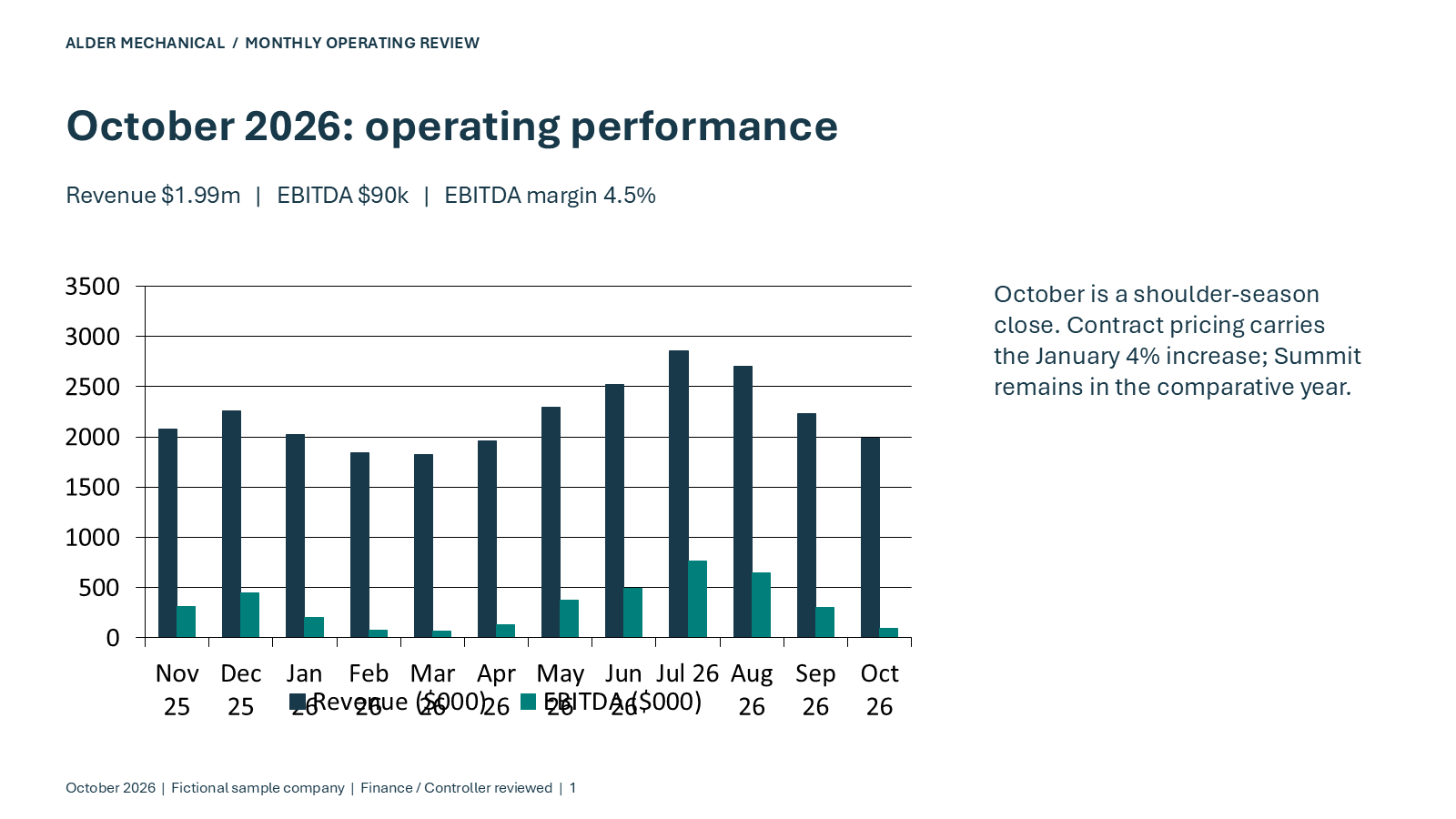
The acceptance result is specific: October revenue is $1,988,001.06, EBITDA is $90,142.13, net income is $41,488.92, and closing cash is $3,426,168.98. Those values are reconciliation targets derived from the synthetic ledger. They are not constants to paste over the formulas.
Validate the workbook and deck separately
The independent validator reconstructs expected results from delivered source exports using decimal arithmetic. It compares 543 October cells across the financial reports and chart results. The broader delivery validation also matches the Office file hashes to the files opened in native Excel and PowerPoint. A local Python validation reads the cached values saved by Excel; it does not itself run Excel.
The six-slide deck keeps three editable charts with embedded data and no external links. That is a different assertion from “six slide images exist.” Download the PPTX and inspect the chart objects and embedded workbooks. Also inspect the rendered slides: correct chart data does not prove that the title, legend or commentary fits.
A good handoff contains the new workbook, new deck, source exports, validation, and a record of unresolved decisions. A reviewer should be able to trace a headline figure back to the ledger without asking the agent what it remembers.
Reproduce the case on Panes
Download the finance history and read the task before running anything. Start with September’s close, not the completed October output. The recorded PowerShell stages are sequential and contain append/roll operations; do not rerun them blindly against an already modified workbook.
Use the Office-installed computer described in the Panes docs, sign in to Office on your kept computer, and run the Office steps in its signed-in desktop. Connect through MCP or the SDKs. Keep API keys, viewer links and customer files out of public logs.
Run the independent validation from a scratch checkout of the public repository after downloading the outputs. The commands below validate the published case; generating a fresh history is a separate operation that replaces local fixtures.
python -m pip install -r requirements.txt
python monthly-close/validate_delivery.py