Define the change you expect before touching Excel
The fixture is an October operating-expense review built from 483 raw export rows and 480 unique documents. Its original report totals $686,500. A refresh test that merely opens this workbook and sees the same total cannot establish that Excel consumed any new input. It might have read an old query table or a saved formula value.
We copied the original workbook into an isolated task directory and appended one unmistakable synthetic document: SEO-FRESHNESS-20261115, dated October 31, 2026, Sales cost center 100, Software expense, $1.00. The expected result was fixed in advance: one new unique document, one occurrence of that identifier, and exactly $1 added to October expense.
Use this deliberate witness in a disposable acceptance fixture. Do not add an artificial financial transaction to a live customer ledger. In production, choose a genuine source watermark, batch identifier or known new document whose expected treatment has been independently established.
Refresh the named query and check its output
The script creates its own Excel instance in the signed-in Windows desktop and opens a copy of the real workbook. It appends to the RawExport table with explicit text fields, then calls the Actuals table’s QueryTable.Refresh(false). After recalculation, it reads the cleaned row count, the witness count and Report!C9.
Microsoft documents the synchronous false argument for supported SQL-backed QueryTable refreshes. It also documents that a return value of true can mean completed or started. The output checks remain necessary: the return value alone is not the acceptance condition for a business report.
$clean.QueryTable.Refresh($false) | Out-Null
$xl.CalculateFullRebuild()
if ($clean.ListRows.Count -ne 481) { throw 'Row count mismatch' }
if ($xl.WorksheetFunction.CountIf($clean.ListColumns.Item('DocID').DataBodyRange, 'SEO-FRESHNESS-20261115') -ne 1) { throw 'Witness missing or duplicated' }
if ([math]::Abs($report.Range('C9').Value2 - 686501) -gt 0.005) { throw 'Total mismatch' }
$wb.Save()
What native Excel actually returned
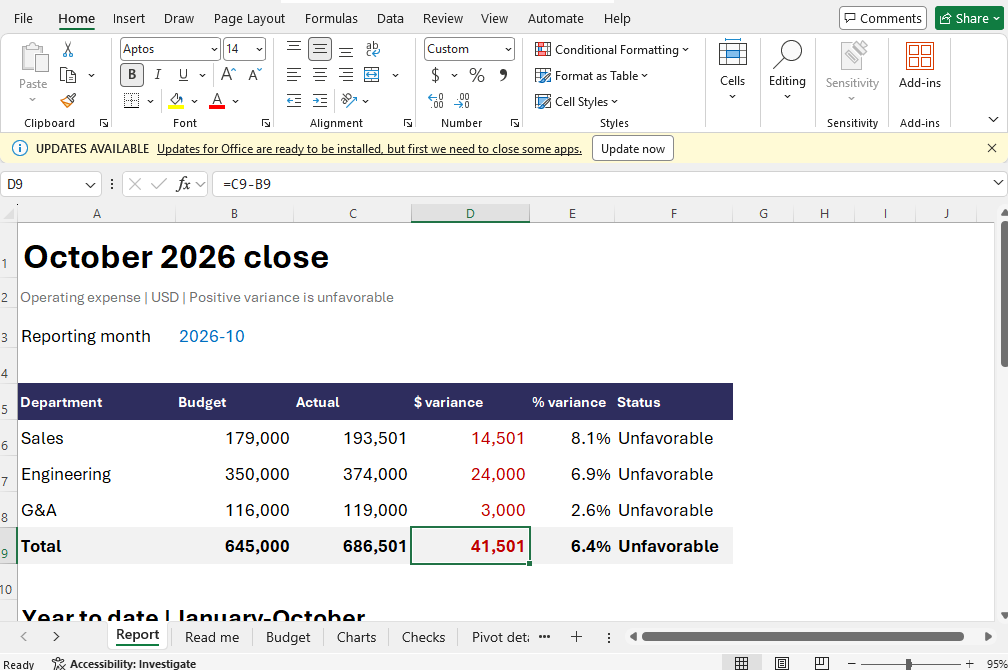
The synchronous refresh returned true. The query table contained 481 rows, the witness occurred once, and the monthly report was $686,501. The existing single Power Query remained present. All three acceptance conditions passed.
| Check | Before | After |
|---|---|---|
| Cleaned documents | 480 | 481 |
| October expense | $686,500 | $686,501 |
| New witness occurrences | 0 | 1 |
| Named Power Query count | 1 | 1 |
Keep the acceptance boundary wider than one cell
A correct report total can hide offsetting mistakes. The witness test checks the new document’s identity as well as its contribution, but it is still a targeted refresh test. A production close also needs source-grain checks, account and period coverage, formula-error checks, schedule reconciliation and review of the actual delivered file.
This script refreshes one query. It does not establish that every PivotTable or presentation chart has refreshed. Treat each downstream layer as a separate output with its own freshness check. The public fixture’s PivotTable reconciliation is useful precisely because a query table and a pivot cache are different states.
Preserve the untouched source, the changed copy, the run report and the reviewed output. If a request loses its reply, inspect the existing witness before appending it again. A second append followed by deduplication can conceal an unsafe retry policy.
Run the same test on your own acceptance copy
Download the exact result JSON and PowerShell script. Upload the original expense workbook as expense-original.xlsx in a new task directory. The script writes refresh-witness.xlsx and its result JSON; it never overwrites the original input.
Run it through the Panes SDK or API with desktop execution enabled. Inspect the output workbook before using its success receipt in a larger process. Keep these prepared execution timings separate from model planning, setup, retries and billing intervals.
For a failed refresh, see our missing-source experiment. For final delivery checks, use the workbook verification guide.