The workbook contained two different answers
The starting point was the saved output of our $1 freshness-witness test. A synthetic October document had reached the Actuals table through Power Query. The SUMIFS-based report included it. That test deliberately refreshed the named query rather than every downstream object.
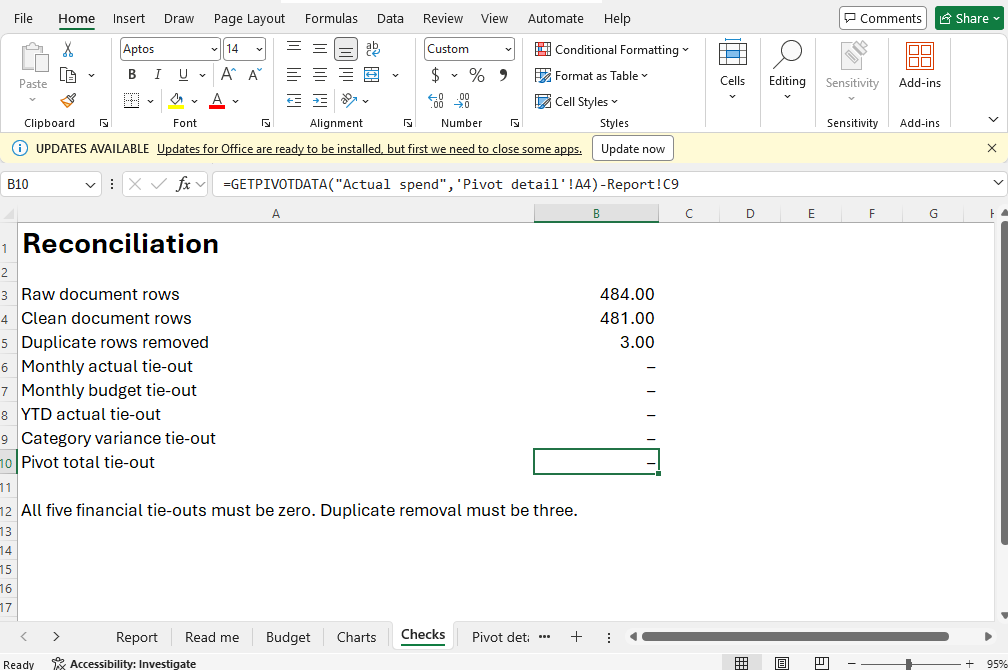
The workbook also contains ExpensePivot, filtered to October, and a check comparing its grand total with the report. On reopening the copy, the query had 481 documents, Report!C9 was $686,501 and the pivot grand total was $686,500. Checks!B10 was minus $1. The file opened successfully; that alone did not reconcile its outputs.
This is a dependency-order test. It demonstrates that this separate query refresh did not update this pivot. It does not establish that every refresh mechanism or every workbook leaves pivots stale. A different workbook may have automatic refresh settings or a different dependency graph.
Refresh the object the next stage actually reads
We selected ExpensePivot by name, called RefreshTable and recalculated the workbook. The call returned true. The pivot then showed $686,501, the report stayed at $686,501, and the difference became zero. Microsoft documents RefreshTable as refreshing a PivotTable report from its source data.
Keep an explicit comparison after the operation. A successful refresh can still read an unintended source range, retain an unwanted filter or omit records outside the configured table. The return value establishes less than a reconciled business output.
$pt = $wb.Worksheets.Item('Pivot detail').PivotTables().Item('ExpensePivot')
if (-not $pt.RefreshTable()) { throw 'Pivot refresh failed' }
$xl.CalculateFullRebuild()
$pivotTotal = $pt.GetPivotData('Actual spend').Value2
$reportTotal = $wb.Worksheets.Item('Report').Range('C9').Value2
if ([math]::Abs($pivotTotal - $reportTotal) -gt 0.005) {
    throw 'Pivot and report disagree'
}| Measure | Before | After |
|---|---|---|
| Clean query documents | 481 | 481 |
| Formula report | $686,501 | $686,501 |
| Pivot grand total | $686,500 | $686,501 |
| Pivot less report | −$1 | $0 |
Make disagreement block the handoff
If the management deck reads the pivot while the workbook summary reads formulas, the two deliverables can disagree even though both look complete. Define which layer supplies each slide or exported table, then reconcile those layers before releasing the files.
For this fixture, the sequence is accepted source rows, query refresh, formula calculation, pivot refresh, reconciliation, save and review. Other workbooks need their own order. A connection feeding another query or a model-backed pivot may require different operations; copying this sequence without inspecting the dependencies would weaken the test.
Our Checks sheet compares the pivot total with the report using GETPIVOTDATA. That creates a visible control a reviewer can inspect. It is useful alongside independent source reconciliation, not a replacement for it: two wrong outputs can agree.
Inspect the stale and refreshed files
Download the stale-pivot starting workbook, refreshed workbook, exact results and script. The script expects refresh-witness.xlsx in a new task directory and writes a separate pivot-refresh.xlsx.
These are synthetic acceptance fixtures. The first intentionally contains a pivot mismatch; it is evidence of the failure, not an approved financial deliverable. Keep both files so a reviewer can reproduce the transition rather than seeing only the repaired result.
Use Panes desktop execution for the native step. Start with the query freshness test, then apply the broader workbook verification checks before your agent delivers a report.