An identifier can look numeric without being a number
Our fixture has Entity, Account, Document and Amount columns. The first record uses entity 00100, account 010100, document 1234567890123456 and amount 1250.25. The second uses 00200, 020100, 9999999999999999 and 2400.50. These are fictional codes and document identifiers, not personal or payment information.
The amounts are quantities we intend to add. The other columns identify records. Their characters matter: changing a code or a document key can break a join, prevent a match or merge records that should remain distinct. A financial total can still tie while those identities are wrong.
Microsoft documents automatic conversions and Excel’s 15-digit numerical precision. It recommends text for identifiers that need their original characters preserved. Our experiment measures the behavior in the tested desktop configuration; current Excel also offers conversion settings that can change the automatic-opening path.
The amounts survived while the keys changed
We opened the CSV through Workbooks.Open and read Value2 from the cells. Entity and account codes lost their leading zeros. Both 16-digit document identifiers changed. The amounts remained 1250.25 and 2400.5, so an amount-only acceptance check would have missed the identity damage.
In the second path, we parsed the CSV as strings, formatted the first three destination columns as text, and wrote those fields as explicit strings. Amount was cast separately to a double. The codes and all 16 document characters then matched the source.
| Field | Source | Automatic open | Explicit types |
|---|---|---|---|
| Entity | 00100 | 100 | 00100 |
| Account | 010100 | 10100 | 010100 |
| Document | 1234567890123456 | 1234567890123450 | 1234567890123456 |
| Amount | 1250.25 | 1250.25 | 1250.25 |
Set the type before the value arrives
The critical ordering in the tested path is to apply text formatting to identifier columns before setting their values. Casting the imported PowerShell fields to strings also avoids handing wrapped CSV values directly to COM. Monetary cells receive a separate numeric conversion.
$sheet.Range('A:C').NumberFormat = '@'
$sheet.Cells.Item($row, 1).Value2 = [string]$record.Entity
$sheet.Cells.Item($row, 2).Value2 = [string]$record.Account
$sheet.Cells.Item($row, 3).Value2 = [string]$record.Document
$sheet.Cells.Item($row, 4).Value2 = [double]$record.Amount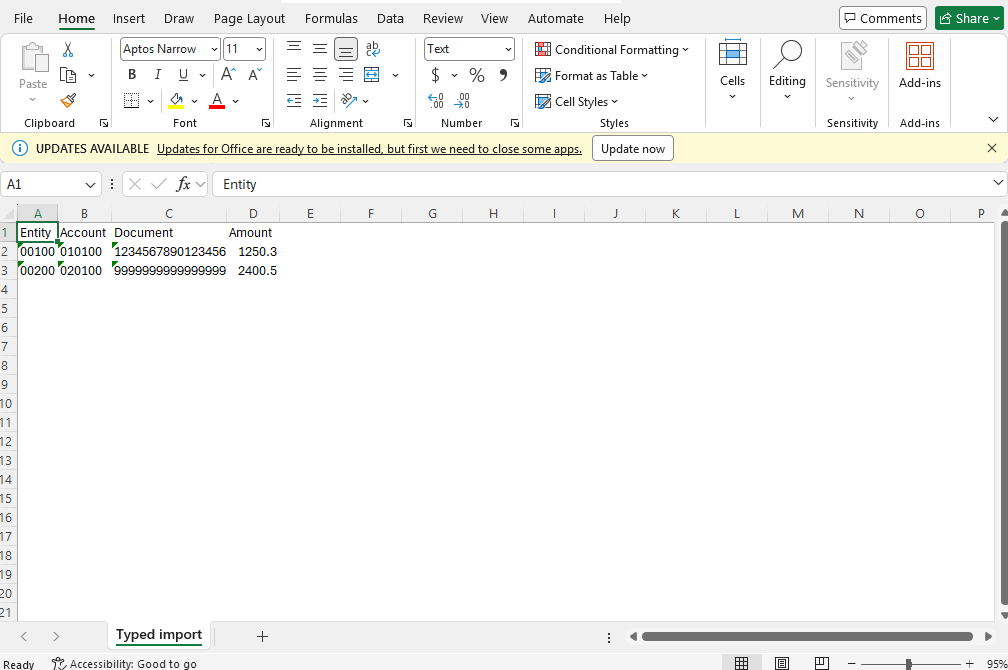
Compare keys as well as totals
Treat the raw export as the authority for the identifier characters. Compare the imported key set with the source key set, inspect duplicates and confirm that expected joins resolve. Do not normalize leading zeros away unless the source’s identity contract explicitly allows it.
A custom number format can make a short numeric code display leading zeros. That is different from preserving a text identifier for downstream programs. Formatting an already-truncated long number does not recover the missing digit. Reimport from the intact source instead of guessing a repair.
Our numeric amount conversion matches this fixture’s simple decimal-point CSV. Production imports need an explicit locale, currency and precision policy. The duplicate guard in our companion guide uses Decimal for source comparisons; its normalization rules should likewise be checked against the source contract.
Run both paths against the same bytes
Download the two-row CSV, automatic workbook, typed workbook, result JSON and native script. Run the script in a new task directory. It creates its own fictional CSV and saves separate outputs.
The test is deliberately small so every changed character is inspectable. It establishes this failure mode, not a throughput result or comprehensive CSV parser evaluation. Add your own delimiter, quoting, encoding and locale cases before accepting a production source.
For an agent working in real Excel on Panes, identity checks belong before query refresh and report delivery. Pair them with the duplicate-document guard and independent workbook validation.